Posts

Our Git workflow and Build Process - Part 2
Image
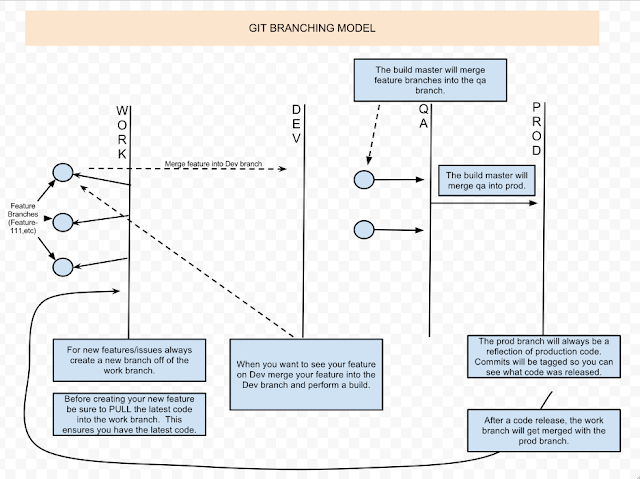
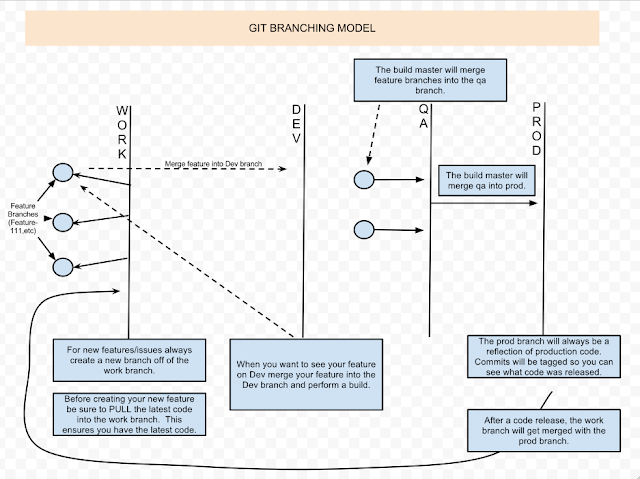
In a previous post I discussed our Git workflow.   In this post I am going to discuss how our build process works with our Git workflow. To recap here is our build process, Figure 1 Figure 1 As we work on features we are always in a feature branch.  So for example, web-11 is an actual feature branch that we completed.   So when we worked on web-11 we committed changes to it.   As we commit two git hooks come in to play. Here is a picture of the git hooks, Figure 2 Figure 2 These hooks are installed manually into the repositories hooks folder.   Both of these hooks are simple .NET 4.0 console applications.    To ensure that Git can call the hooks you need to remove the file extension (remove . exe ). commit-msg hook The commit-msg hook simply adds the name of the feature branch into the commit message.    I put the feature branch name at the end of the commit message in between pipe charac...
Our Git Workflow and Build Processes

Image
The purpose of this post is to document how my team is using Git.  I will discuss our Git workflow and how we use git hooks to streamline our build process.  We use Bamboo for our build processes and I will discuss how we automate our builds (including database code) using Bamboo and Git.    We develop with Microsoft tools, so just a caveat, although the workflow could apply to anyone, just wanted to give you a heads up in case you come from the world of linux and want to stop reading now :-). Standing on the shoulders of others First I want to give thanks and credit to a couple resources.  The following links were invaluable for me; This post over at nvie.com described a branching model that is close to ours. Understanding tracking and remote tracking branches was cleared up for me by this post over at gitguys.com Our Git workflow Here is a picture to get us started. Figure 1 feature branches We create a new feature branch for each...

Speeding up our website - My experiences with Sitecore

Have you ever ran YSlow or PageSpeed against your site and you get poor grades in the following categories Make fewer http requests Minify javascript and css Compress components with gzip. Our site got poor grades for these items and my initial response was who cares.  Bandwidth is almost unlimited anymore and we are conditioned to sites taking a few seconds to load. I had this who cares attitude until I started actually profiling our site and realizing that minimal changes could make a big difference in user experience.   Instead of our site taking 5 - 8 seconds to load it could take less than 5 seconds to load. Also, as a developer I typically never involve myself in the http request pipeline from the browser perspective.  I'm abstracted from that, especially being a .net developer, we are abstracted by many things.    But, making the site perform well from a browser perspective is just as important as making your code algorithms perform we...

Displaying shared content across multiple Sites

Sitecore does a great job of separating content from the presentation of the content. This is the main selling point of any CMS tool, but Sitecore does an excellent job of allowing this to happen. What I found not intuitive in Sitecore is the ability to display shared content. PROBLEM For instance, assume you have stories which live outside of the context of any site site. The stories can be tagged with specific categories, where each category associates to a different web site. (ok, this is a simple example, but follow me here). So you have the following structure in your sitecore tree /sitecore/content/site 1 .. [all of the nodes that make up the site] /sitecore/content/site 2 ..[all of the nodes that make up the site] /sitecore/content/Stories 2010 January Story Item 1 [category = site 1] Story Item 2 [category = site 1 and site 2] February Story Item 1 [category = site 1 and site 2] ...etc [you get the picture] POSSIBLE SOLUTIONS Wh...

Saving extra data to a sitecore field

We use the Shadowbox component on our web site. How we use the shadowbox is whenever an image is displayed the user can decide if they want the image to be clickable to open up a video or other media content (podcast). In our first web site in Sitecore the users had to put the shadowbox parameters inside the html. This was not a good seperation of presentation and content. But our first site had to be up quick, so we went with the easiest albeit harder to maintain approach. Now the users groan whenever they have to enter parameters for a shadowbox link or other html that they must enter into the content. So the goal for our future sites is to seperate presentation from content as much as possible (and have exceptions when necessary). After batting around a few ideas on how to implement the shadowbox parameters needed into Sitecore I came to the following conclusions: I did not want to add a new field type, that would require too much work. I'm pretty lazy :). No, actual...